Basics of SEO for Beginner:
SEO stands for Search Engine Optimization. Basics of SEO help you understand how search engines find your content
It improves how your website appears in search results on Google.
When you apply SEO correctly, your pages reach more people without paid ads.
You focus on what users search and build your pages in a way that matches their needs.
How Search Engines Work
- Google sends crawlers to scan your pages.
- Crawlers read your text, images, links, and structure.
- Google stores this information and shows your pages when people search relevant queries.
- When your page loads quickly and answers the query clearly, your ranking improves.
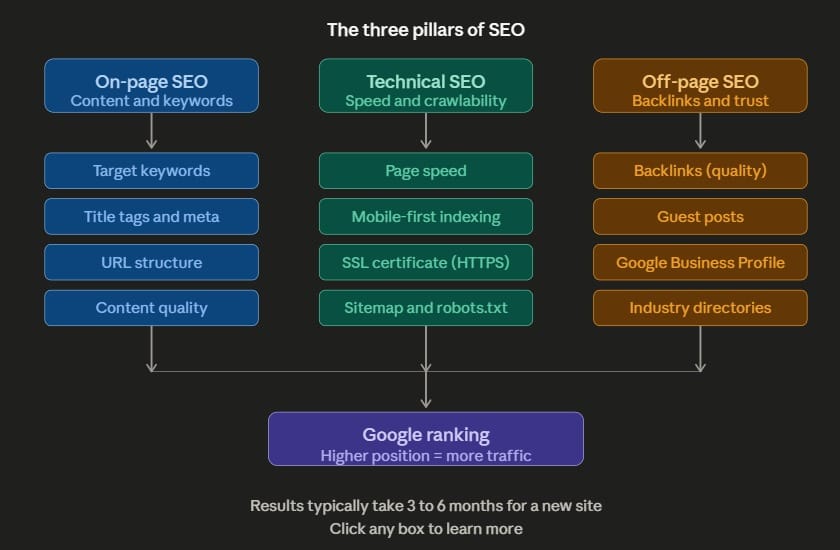
- A page with clean structure, proper keywords, and trustworthy information performs well.
Research Keywords Smartly
- Keywords are words that users type in Google.
- You target simple keywords first. Example: “SEO basics for beginners”, “On page SEO steps”, “How to rank fast”.
- Use tools like Semrush, Ahrefs, Google Keyword Planner.
- Aim for keywords with low difficulty and at least 500 to 2000 monthly searches.
- Check what people are already reading. Search your keyword on Google and see the top 10 pages.
- Look at the real words they use and fill the gaps with information they missed.
Use Keywords Naturally
Add your main keyword in the title.
Place the main keyword in the first 100 words.
Use the main keyword one to three times every 500 words.
Add variations that sound natural. Example: “SEO for beginners”, “simple SEO guide”.
Place keywords in headings, URL, introduction, conclusion, and image text.
Avoid stuffing. When you force too many keywords, your page drops in ranking.
Master On Page SEO
- Create a title that answers the user query. Example: “Basics of SEO for Beginners”.
- Write headings that guide users step by step.
- Keep paragraphs short. Most readers stay longer on clean pages.
- AdInsert supporting images with relevant names. Example: seokeywordresearch.jpg
- Add internal links. Example: link to your “keyword research guide”.
- Add external links to trusted sites like Google Search Central.
- Write a simple URL. Example: yoursite.com/seo-basics
- Add a meta description of about 150 characters.
Improve Technical SEO
Choose fast hosting. A delay of even two seconds increases bounce rate.
Keep image size under 250 KB for faster load speed.
Test your speed on Page Speed Insights. Aim for at least 80 on mobile
Use HTTPS for safety and trust.
Make your website mobile friendly. More than half of searches come through mobile devices.
Write Useful Content That Helps Users
Understand what users need. Give practical steps. Share examples from real tasks.
Use simple English so every reader understands you. Keep information accurate. Avoid fluff.
Answer possible questions.
Add updated facts.
Keep structure easy to scan. Use headings, lists, and clear points.
Improve User Experience
- Keep your site clean. Use readable fonts. Place your call to action in a clear spot.
- Add search bar for easy navigation. Keep menus simple.
- Add bullets instead of long paragraphs.
- Remove popups that disturb reading.
- Increase spacing so text does not look crowded.
Learn Off Page SEO
Off page SEO focuses on building trust from outside your site. Get backlinks from relevant and safe websites. Share your articles on social media platforms. Join community groups like Quora and Reddit and answer with value. Reach similar websites and request link placements when relevant. Avoid paid backlinks. Many of them drop rankings.
Track Your Performance
Use Google Search Console to see which keywords your pages appear for. Track clicks, impressions, and ranking trends. Check your top keywords every week. Use Google Analytics to see user behavior.
Watch time on page. Aim for at least 40 seconds for an article. Look at bounce rate. If it goes above 70 percent, improve page quality. Check which pages bring the most visitors and update them monthly. Remove outdated information regularly.
Update Your Articles
Search engines like fresh pages. Add new examples monthly. Update screenshots once every three to six months.
Improve your headings. Fix grammar, facts, and structure. Check your competitors and see if you missed important points.
Add a FAQ section with three to five questions that users search often.
Learn How Long SEO Takes
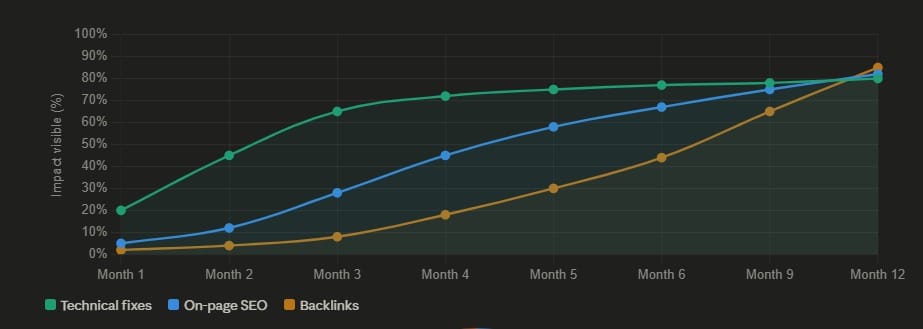
SEO takes time. New websites usually take two to three months to show clear results. A consistent publishing plan helps you grow faster.
Update your pages every month. Add two to four fresh articles every week if possible.